How Does a Liquor Store POS Use Dual Pricing to Offset Processing Costs?

liquor store dual pricing POS

Walk into any liquor store on a Friday evening, and you’ll see the same story playing out at the register: a steady stream of card taps, chip insertions, and contactless payments. Cash is becoming the exception, not the rule. While this effortless experience is great for consumers, it creates a hidden cost for the liquor store owners, who have to pay a processing fee on every single one of those card taps.

For an industry that already runs on the narrowest of margins, credit card processing fees feel like a direct hit to the bottom line on every sale. The good news? A growing number of owners are taking control of these costs by adopting a liquor store dual pricing POS system. By showing both cash and card prices at checkout, this setup wipes out processing fees, protects your profits, and keeps pricing clear for customers.

In this guide, we’ll learn in detail about how it works, why it matters specifically for liquor store owners, and how the right liquor store POS system can simplify the entire payment process.

Why Credit Card Fees Hit Liquor Stores Harder?

On paper, running a liquor store looks easy. Inventory moves fast, and customers buy every day. But ask any store owner, and they’ll tell you margins are razor-thin. Between high taxes, license fees, and tough competition, there’s little room for extra costs. That’s why credit card processing fees hurt so much. Without a plan to offset those swipe fees, you’re giving away a huge chunk of your profit every year.

For liquor stores, these credit card fees sit in a uniquely painful spot. Here’s why:

High average ticket sizes:

Wine, spirits, and craft beer purchases are comparatively more expensive than a typical convenience store basket. Because interchange fees are calculated as a percentage of the transaction (usually 1.5%-3.5%), higher ticket prices mean more dollars lost per sale.

Small margins to start with:

Alcohol is tax-overwhelmed and tightly regulated. Between state excise laws, costly licensing fees, and aggressive pricing from retail chains, independent liquor store margins are squeezed from the beginning.

Card-heavy customer base:

Liquor purchases tend to peak during evenings and weekends, exactly when consumers are least likely to be using cash. This means more transactions are processed through alcohol retail payment systems, where processing fees apply.

Seasonal spikes:

Holidays, game days, and celebrations lead to sales rushes, and every one of those transactions comes with a fee attached. During the high season, that little 2-3% fee can add up to thousands of dollars in lower earnings.

In a few words, liquor retailers process more dollars per swipe, more commonly, on shorter margins than almost any other store category. This is the only reason why most retailers are seeking a way to counterbalance or avoid this cost completely.

What Exactly is a Liquor Store Dual Pricing POS System?

A dual pricing POS system is technology that allows a retailer to display and charge two different prices for the same item: one price for cash payments, and a slightly higher price for card payments. Instead of slapping customers with a frustrating surcharge at checkout, dual pricing twists the cost right into your standard cash discount setup. The price they see on the tag already covers the processing fee, making the whole experience feel seamless.

We’re not talking about a temporary fix or playing in a legal gray area. This is a fully compliant cash discount strategy that’s already big in the restaurant and gas station industries, and it’s now taking over liquor stores. Why? Because it simply shifts processing costs to the cards that generate them—all while keeping things completely transparent and fair for your cash-paying regulars.

How it Works at the Register

Here’s the simplified version of how dual pricing POS works in a real store:

  1. Every product carries two visible prices — a cash price and a slightly higher credit price (the difference typically mirrors the store’s processing cost, often 3–4%).
  2. When a customer checks out, the POS system automatically detects the payment method.
  3. If they pay with cash, they’re charged the lower price.
  4. If they pay with a credit or debit card, the system automatically applies the credit price — no manual math, no awkward conversations, no separate “convenience fee” line item.
  5. The receipt clearly reflects the applied pricing, keeping everything transparent and above board.

The whole process happens in seconds, and when powered by RetailZPOS, a well-designed liquor store point of sale software, it’s fully automated. The cashier doesn’t need to calculate anything or explain a surcharge.

Dual Pricing vs. Surcharging vs. Cash Discounting: Understanding the Differences

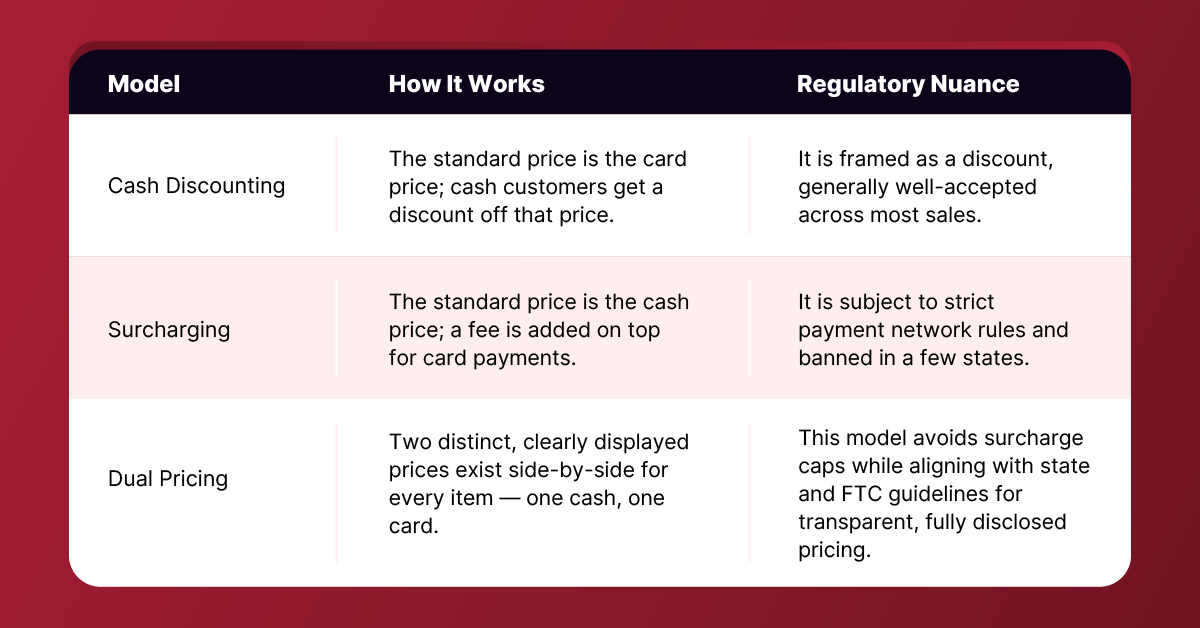
These three terms get thrown around interchangeably, but they are legally and practically different. Understanding this difference matters, specifically for legal dual pricing program adherence.
Dual Pricing

The crucial distinction between surcharging and dual pricing comes down to how prices are displayed and structured. Surcharging adds a fee at checkout to a credit transaction, which triggers card network registration, strict fee caps, and prohibitions in certain states. Dual pricing, when implemented correctly with clearly displayed cash and credit prices before purchase, operates under a separate framework. When properly structured to meet state and network transparency standards, it offers multi-state retailers a consistent, transparent pricing model.

Key Benefits of Dual Pricing for Liquor Store Owners

Direct fee savings:

This is where you see the biggest impact. By shifting card processing costs to card-paying customers, store owners can offset the bulk of their monthly processing expenses. Depending on your store’s sales volume, that can mean keeping hundreds to thousands of extra dollars in your pocket every single month.

Increased cash flow:

Every dollar not paid out in interchange fees is a dollar that stays in the business. Over a financial year, this can significantly improve cash reserves. It gives the freedom to expand stock levels, marketing, or simply build a comfortable safety net for the relaxed seasons.

Designed for Compliance:

Dual pricing meets federal standards and state surcharge laws when set up correctly. Showing both cash and card prices upfront avoids surprise fees at checkout. This approach adheres to major card network rules for cash discounting and keeps compliance risks low.

Customer trust:

It might sound surprising, but dual pricing can actually improve how customers feel about your store. The key is transparency. When both prices are out in the open, shoppers view the system as fair rather than a penalty. Your cash customers love getting a discount. Your card customers appreciate knowing the true cost upfront, with no hidden fees sprung on them at the last second.

Why is a Specialized Liquor POS Essential?

The Manual Effort

Trying to run dual pricing on a general system is a logistical nightmare. It is even worse if you try to perform it manually. Liquor stores carry thousands of items. There are constant inventory changes from seasonal wines, limited releases, sales bundles, and multi-pack discounts.

Calculating and updating two prices for every single item is tiring; keeping your shelf tags up to date is also difficult. This causes wrong prices, legal compliance issues, and frustrated consumers.

The Solution: How RetailZPOS Makes It Flawless

RetailZPOS is the ultimate solution built for a liquor store POS system. Instead of bolting dual pricing onto a generic retail platform, RetailZPOS is made from the ground up to manage the specific challenges of alcohol retail.

Automatic Price Calculations

RetailZPOS implements automated dual pricing POS logic quickly at checkout. The system counts both the cash and credit price for every item in real time, based on your configured fee percentage. There is no risk of human error at the register when you have a smart pos system.

Clear Customer Screens & Receipts

Transparency is the most important part of legal dual pricing, and RetailZPOS ensures every customer-facing screen and printed receipt clearly shows both pricing tiers before the sale is confirmed. This protects your business under federal trade guidelines and creates a great relationship with your shoppers.

Built-In Compliance Support

Every state has different rules, but RetailZPOS keeps things simple. You can easily set your store’s pricing rules, format receipts, and show clear cash-versus-card prices on customer screens and shelf tags. You stay in control, avoid pricing surprises at checkout, and protect your hard-earned profits.

Best Practices for Implementing Dual Pricing in Your Store

Implementing dual pricing successfully takes more than turning a switch on your POS. Here’s how to do it right:

Staff Training:

Your cashiers are the face of this shift. Make sure each team member understands how the cash discount program works, if a customer asks, and knows how to manage the edge cases. When the staff is trained correctly, it turns a confusing pricing change into a smooth, positive customer interaction.

Clear Signage:

Good dual pricing requires clear signs throughout the store. You need to post your pricing policy at the entrance, near the shelves, and at the register. Customers must see these signs well before they pay. When shoppers understand the prices early, you will deal with fewer surprises and complaints.

Inventory & Shelf Tag Syncing:

Imagine the frustration when a customer gets to the register and finds out the price is higher than the shelf tag. To avoid this, use pricing software that links right to your store system. When you change a price, your digital or printed labels update instantly on their own. This keeps your store honest and protects your reputation.

Conclusion

Credit card processing fees aren’t going away. But for liquor store owners, they don’t have to be an unavoidable cost of doing business anymore. A well-implemented dual pricing POS system gives you a fully compliant, customer-friendly way to offset processing costs, protect your margins, and keep more revenue in the business where it belongs.

The real difference comes down to choosing the right technology partner. A generic POS system leaves you managing dual pricing manually—item by item—opening the door to errors and compliance headaches. A specialized liquor store POS solution like RetailZPOS handles the heavy lifting: it automates price calculations, keeps receipts transparent, and gives you simple tools to align with state rules, so you can spend your time running your business instead of doing pricing math at the register.

If rising credit card processing fees have been quietly reducing your profit, now is a good time to look at how DUAL pricing, paired with the right POS technology, can put that margin back where it belongs: in your pocket.

8 Best Liquor Store POS Systems for Multi-Location Retailers

Best Liquor Store POS Systems in 2026

Today, running or managing a liquor store means navigating one of the most functionally complex retail categories. According to the Distilled Spirits Council, U.S. spirits supplier sales totaled $37.2 billion in 2024, underscoring the expansive nature of this highly compliance-focused sector. But behind those impressive numbers is the everyday reality that liquor store owners face. 

It includes managing 1,000 to 3,000+ SKUs with case-to-bottle inventory splits, wine classification, age-verification requirements, and mix-and-match pricing structures that generic retail point-of-sale software simply can’t handle.  Moreover, when you have more than one liquor store to deal with, things become complex and challenging. 

Multi-store alcohol retail requires a highly specialized, hyper-focused technology infrastructure. Finding the best liquor store pos system for an enterprise business means looking past basic checkout features and prioritizing deep operational infrastructure. In this detailed guide, we will break down exactly what makes multi-location liquor POS software different, with a head-to-head comparison of eight leading solutions, key features you can’t skip, and the critical questions to ask any vendor before signing.

What Makes Multi-Location Liquor Store POS Different? (Must-Have Features)

  • Remote Control Over All Locations:

The biggest advantage of a modern cloud-based liquor store POS system is centralized management.

You should be able to:

  • Update pricing across all stores quickly
  • Push new products to every location at once
  • Monitor live sales from a main dashboard
  • Adjust employee permissions remotely
  • Track inventory transfers between stores

For owners managing multiple stores, this removes the weight of visiting different locations for common functional changes.

  • Smart “Case-Break” Tracking:

This is the feature that differentiates a liquor-specific POS from everything else. Liquor stores routinely sell by the bottle, the six-pack, and the case — and the inventory math has to stay clear across all three.

A Liquor Store POS System should automatically:

  • Break cases into single units
  • Maintain precise bottle-level inventory
  • Track cost per bottle and per case
  • Avoid inventory gaps after partial case sales

This function is required for current inventory counts and cost controls.

  • ID Scanning to Protect Your Liquor License:

In the liquor industry, compliance is a non-negotiable requirement.

Your POS system should support:

  • Government-issued ID scanning
  • Age validation prompts
  • Transaction-level verification logs
  • Manager approval controls
  • Regulatory reporting for inspections

When you opt for a POS for Liquor Stores that has automated ID verification, it lowers the human errors and helps protect your liquor license from costly penalties.

  • A Single Dashboard for All Sales:

When you have to manage more than one liquor store, a single dashboard is a must. Multi-location retailers require integrated reporting without losing store-level information.

The ideal Liquor Retail POS System should provide:

  • Sales reporting across all locations
  • Store-by-store performance analysis
  • Top-selling brands and SKUs across locations
  • Actual timing inventory clarity
  • Workforce and sales analytics
  • Profit margin monitoring

With a single dashboard, liquor store owners can quickly recognize trends, lagging stores, and stock availability.

Comparing the Top 8 Liquor POS Systems

POS SystemBest ForMulti-Location StrengthLiquor-Specific ToolsPricing FlexibilityVerdict
RetailzPOSDeveloping alcohol retail chainsExcellent centralized controlStrong liquor-focused featuresContact us for a quoteBest overall for multi-location liquor stores
KORONA POSCompliance-heavy retailersStrong chain managementSolid liquor compliance tools~$59/month per locationGreat for operational control
LightspeedHigh-volume retailAdvanced reportingLimited liquor specialization~$89/monthStrong analytics, less liquor-focused
HelcimPayment-first businessesBasic multi-location supportMinimal liquor featuresInterchange + onlyBetter for general retail than liquor
SquareSmall independent storesEasy to useBasic inventory onlyFree (+ processing)Good starter option
NRSConvenience + liquor storesModerate chain featuresSome liquor-friendly functions~$29.99/monthUseful for mixed-format retailers
BottlePOSLiquor-only operationsDesigned for bottle shopsStrong liquor inventory toolsContact us for a quoteGood niche solution
CloverSmall to mid-size storesIt depends on the app ecosystemLimited native liquor tools~$14.95/month + hardwareFlexible hardware, mixed software experience

RetailzPOS

Overview:

RetailzPOS is specifically designed to manage high-volume, extremely complex, multi-location industries such as liquor stores, convenience stores, CBD stores, and smoke shops. It has built-in advanced liquor tools directly into its core framework. The cloud-based Liquor Store Management Software allows store owners to manage inventory counts, labor performance, and profit calculations across 10+ locations simultaneously from a single central location.

Best Liquor Store POS Systems in 2026 Comparison Table

Key Multi-Store POS System Features

  • Automatic Inventory Cascading- Instantly updates stock counts whenever a case is broken into singles or multi-packs.
  • EDI Invoicing – Intelligently maps, verifies, and integrates digital vendor files (TXT/CSV) directly into your back office in 2–3 hours.
  • RAI – A 24/7 built-in intelligent assistant providing instant back-office support, troubleshooting answers, and step-by-step training guidance.
  • NVR (Network Video Recorder Integration) – Overlays real-time register transaction data onto your security footage to instantly detect errors and prevent shrinkage.

Pros:

  • AI-powered back office (RAI) reduces manual admin time
  • Intuitive interface with a low training curve for staff
  • Powerful Liquor Inventory Management Software suited to high-SKU liquor stores
  • Cloud-based with remote access across all locations

Verdict:

The complete best all-around software for a multi-location liquor business. It offers the perfect mix of deep, specialized alcohol inventory tools, robust loss prevention, and complete processing freedom.

KORONA POS

Overview:

KORONA POS is one of the leading cloud-based liquor store POS systems made for large-scale retail environments, amusement parks, multi-location branches, and big liquor stores. Its operational hub is built for significant growth, allowing you to organize your stores into custom location groups, manage complex asset distribution, and simplify royalty tracking.

Features:

  • Automated Min/Max Stock Optimization
  • Location-Specific Threshold Rules
  • Auto-Generated Purchase Orders
  • System-Locked Age Verification
  • Basic item matrix sorting

Pros:

  • Processor-agnostic — choose or switch payment processors freely
  • Extended free trial with money-back guarantee
  • Built-in age verification and compliance tools out of the box
  • Highly Flexible pricing model as you add locations

Verdict:

This Liquor Store Point of Sale System is a strong choice for large, expanding retail franchise operations that prioritize absolute software speed, stability, and predictable billing over niche, out-of-the-box liquor workflows.

Lightspeed

Overview:

Lightspeed is a highly evolved, beautifully designed cloud retail point-of-sale system that excels in inventory monitoring and high-end omnichannel commerce. The POS offers a polished multi-site management solution, authorizing teams to centrally develop and selectively arrange the product database across multiple locations. Thus, maintaining strict user access controls over store managers.

Features:

  • Advanced Inventory tracking
  • Vintage and SKU tracking
  • Origin-Based Cataloging
  • Flexible Product Classification

Pros:

  • Embedded e-commerce for easy click-and-collect ordering
  • Sleek, modern interface that makes staff training incredibly fast
  • Premium, built-in advanced reporting and data analytics tools

Verdict:

A premium, polished, data-rich choice for high-end wine and spirits boutiques with a heavy focus on elegant e-commerce and local delivery, provided you are fully comfortable committing exclusively to their payment network.

Helcim

Overview:

Helcim takes a completely novel approach to the POS market by positioning itself as a customer-first, clear financing services provider that offers its retail software away for free. The Helcim POS system offers clean, multi-device cloud synchronization, allowing store owners to track sales pipelines across various storefronts from the unified dashboard.

Pros:

  • Unmatched pricing transparency with zero monthly software subscription fees.
  • Built-in Interchange-Plus processing rates that lower automatically as your sales volume grows.
  • Highly cost-effective for multi-store networks looking to cut fixed software costs.

Verdict:

Helcim is an affordable POS system for multi-location liquor stores with simpler operational structures that want to remove monthly software subscription bills and protect their processing margins.

Square

Square is the best-known name in small business POS, and for good reason. It’s fast to set up and free at the entry level. Their expanded “ Square for Retail” software tier helps independent retailers to manage inventory across various locations. The Square offers a flawless, clean, centralized cloud dashboard. You can easily track multi-store stock levels, quickly view actual time trade tables from your phone, and can transfer items between locations with a few clicks on the spot.

Pros:

  • Instant setup with a nearly zero-day learning curve for staff
  • Beautifully designed, reliable hardware like the all-in-one Square Register
  • Seamless built-in tools for automated customer loyalty programs and digital marketing

Verdict:

The Square POS is ideal for temporary pop-up shops, micro-chains, or beginner retailers with low volume who value quick setups above everything else. It lacks the depth and security required for high-traffic business environments.

NRS

NRS is a pos platform specifically designed for independent retailers, urban convenience hubs, and mid-sized liquor outlets nationwide. It comes bundled with the NRS Pay processing network and includes integrated advertising capabilities through its BR Club rewards program. The pos system offers robust, high-volume register synchronization, enabling multiple checkout lanes to stay connected through a centralized management dashboard.

Key Features:

  • ID Check Prompts
  • Customer Loyalty Rewards
  • Built-in Rebate Tracking
  • ScanData Integration

Pros:

  • Highly durable, industrial-grade hardware built to survive spills and heavy abuse.
  • Exceptionally reliable register network performance during busy shifts.
  • Rugged design that stands up to constant, high-volume checkout wear and tear.

Verdict:

A tough, secure, and reliability-focused solution made for large individual liquor stores and urban multi-lane convenience hubs where hardware toughness and strict staff isolation are top priorities.

BottlePOS

BottlePOS is one of the few software programs that serve independent package stores and wine retailers. Every feature in the system was created with the liquor store operator in mind — from case pricing to vendor invoice matching. The pos features a clean, cloud-enabled back-office suite that lets you log in from anywhere to review your inventory insights and evaluate store health.

Key Features:

  • Automatic Inventory Reordering
  • ID Verification Prompts
  • BottleCapps Integration for Online Orders and Delivery

Pros:

  • Highly intelligent, automated tools to shift processing costs away from your margins
  • Clean, focused interface built exclusively around standard liquor store workflows
  • Built by a team with deep, dedicated expertise in the beverage alcohol industry

Verdict:

Bottle POS is incredibly smart, specialized niche software for single operators or family businesses running 1-2 boutique neighborhood package stores who want automated stock tracking.

Clover

Clover is a big player in the traditional point-of-sale industry, mostly known for its beautiful, sleek, high-end touchscreens and heavy distribution through traditional banking institutions. The virtual terminal hub enables you to view basic multi-device performance, handle global item categories, and track employees in and out across different physical storefront locations.

Pros:

  • Stunning, design-forward hardware that elevates your checkout counters.
  • Massive third-party app marketplace providing endless customization options.
  • Greatly acknowledged, user-friendly customer interface.

Verdict:

Clover is a beautiful hardware solution that works well for standard retailers, but becomes too costly and disconnected for high-volume multi-location liquor stores. Moreover, it is highly dependent on third-party app subscriptions.

Which Should You Choose?

Choosing the right point of sale system ultimately comes down to finding a platform that matches the size, complexity, and needs of your operation.

  • Choose RetailzPOS if you want the complete all-in-one software package for multi-location liquor, convenience, or smoke shops. It gives you the advanced inventory management tools, integrated loss-prevention camera text tools (NVR Integration), and freedom to select your own payment processor.
  • KORONA POS is best suited for large franchise groups and multi-state retail chains. If predictable monthly software costs and franchise royalty management are top priorities, it’s one of the strongest options on the market.
  • Choose Lightspeed Retail if your focus is on premium merchandising and online sales. It’s particularly well suited for wine and spirits retailers that need detailed product categorization and a professional, customer-friendly e-commerce experience.
  • Choose Helcim if you’re an independent retailer expanding to a handful of locations and looking to keep operating costs under control. Its subscription-free software and transparent Interchange-Plus pricing make it an attractive option for businesses focused on minimizing overhead as they grow.
  • Choose Square for Retail if you’re launching a pop-up shop, seasonal store, or small boutique and need to get up and running quickly. Its direct interface, quicker setup process, and modern hardware make it a strong fit for retailers that value simplicity over highly specialized inventory management.

The Best All-Around Choice for Multi-Location Liquor Stores: RetailzPOS

Most general POS systems force you to make bad compromises. They either lock you into expensive credit card processors or make you buy extra apps just to track simple things—like breaking open a case of beer to sell single cans. RetailzPOS is different. It is a feature-rich POS system built with tools specifically tailored to the alcohol industry.

Additionally, RetailzPOS offers a built-in Dual Pricing feature designed to help retailers offset merchant service expenses. Instead of treating credit card processing fees as an unrecoverable operational cost, the system allows you to clearly and compliantly display two price points at checkout—a standard price for card transactions and a discounted price for cash customers. When implemented in full conformity with state regulations and card network guidelines, a dual-pricing program can significantly offset your overall credit card processing costs.

Easy Stock Management and Automatic Invoices

The best part about RetailzPOS is how much manual work it cuts out for your staff. Usually, when a big shipment arrives, someone has to type every single bottle and price into the computer. RetailzPOS connects directly to your distributors. It brings in the invoices automatically and updates your costs straight away.

It also processes split inventory easily. If you buy a 24-pack of beer but sell it as individual six-packs or single cans, the system on its own subtracts the right amount from your stock. You don’t have to do any confusing math or track missing bottles on a clipboard.

Extra Ways to Protect Your Profits

In the liquor industry, making money often depends on finding extra savings. RetailzPOS has internal ScanData tools. This means the system by itself sends your sales data to big tobacco and alcohol brands so you can get paid manufacturer refunds. It allows retailers to easily participate in brand-sponsored discount programs that can return meaningful revenue directly to your business.

Additionally, RetailzPOS offers a built-in Dual Pricing feature designed to help retailers lower their merchant service expenses. Instead of seeing credit card processing fees as a fixed loss, the system allows you to clearly and compliantly display two price points at checkout. One a standard price for card transactions and other a discounted price for cash customers.

When implemented in full conformity with state regulations and card network guidelines, a dual-pricing program can remove up to 90% or more of your credit card processing fees.

Final Words

You’ve built a real, growing business. Your multi-store POS software should match that ambition, not hold it back with manual work arounds and hidden add-ons.

Most liquor retailers don’t realize how much time and money their current software is costing them—until they finally switch to a system built specifically for high-volume, multi-location alcohol retail.

Ready to see our automated multi-store dashboard in action?

FAQs

1. How many of your customers are liquor stores specifically?

If liquor stores make up less than 10% of their active user base, don’t go for it. You don’t have to be the test subject for a system that hasn’t been proven against complicated state liquor laws or inventory issues. You should look for a vendor with hundreds of dedicated liquor-store customers who understands the everyday language of split-case breaks, allocated units, and legal checks. 

2. Can your system run a mix-and-match promotion across product categories locally?

The liquor store owners depend heavily on flexible product bundling; for example, buy any 6 individual 750ml bottles of wine and get 10%off, or mix and match any four craft single cans for $12. A standard POS often requires manually creating a separate SKU for every single combination, which is an impossible task. A liquor inventory management software lets you check a box to create custom mix-and-match rules across the overall inventory groups. The system automatically updates the pricing at checkout as soon as the criteria are met.

3. What happens to my sales data if the internet goes down?

In high-volume retail, a connectivity issue can cost you thousands of dollars in lost business per hour if your registers stop. Before finalizing the software for your store, you must ask if the system features a true offline mode. If the internet goes down, the register should allow you to continue scanning barcodes, printing paper receipts, and securely keeping encrypted card swipes locally.

4. Is age verification recorded per transaction for audit purposes?

To meet liquor compliance requirements, the system must keep a permanent record of every age verification check. Each record should include the date and time of the scan and be linked to the related sale for easy auditing. To protect customer privacy, the system should only record that the ID was scanned and verified, without storing sensitive personal information. Compliance reports should also be easy to export and available within two minutes.

5. What’s the per-location cost as I scale from 3 to 10 stores?

Many software companies look incredibly cheap upfront when you only have one store, but their pricing models feature steep tier jumps as you expand. Ask for a complete, transparent breakdown of software licensing costs, mandatory back-office server fees, and data synchronization costs. Does the price scale linearly, or do they offer volume discounts for enterprise portfolios?

6. Which payment processors can I use?

Payment processing can have a major impact on long-term operating costs. Many modern POS systems use closed payment ecosystems, requiring businesses to use the vendor’s payment processor or pay extra fees for choosing another provider.
For high-volume retailers, open payment processing is important. It allows the business to work with different merchant service providers and negotiate better processing rates, instead of being locked into a fixed pricing model set by the POS vendor.

7. What does the migration/onboarding process look like?

Moving to a new POS system can be one of the most challenging parts of a retail technology upgrade. Any downtime, missing inventory data, or transaction errors during the transition can spoil daily operations and impact sales. That’s why it’s important to choose a vendor with a proven, well-structured onboarding process.
The best providers offer hands-on support throughout the transition, including help cleaning and importing existing product, supplier, and customer data. A dedicated implementation manager should guide the project from start to finish, ensuring each store is set up correctly and staff are prepared before launch. Ideally, the migration process should allow historical sales and transaction data to transfer smoothly in the background, minimizing disruption and avoiding the need for store closures during the switch.