How Does a Liquor Store POS Use Dual Pricing to Offset Processing Costs?

liquor store dual pricing POS

Walk into any liquor store on a Friday evening, and you’ll see the same story playing out at the register: a steady stream of card taps, chip insertions, and contactless payments. Cash is becoming the exception, not the rule. While this effortless experience is great for consumers, it creates a hidden cost for the liquor store owners, who have to pay a processing fee on every single one of those card taps.

For an industry that already runs on the narrowest of margins, credit card processing fees feel like a direct hit to the bottom line on every sale. The good news? A growing number of owners are taking control of these costs by adopting a liquor store dual pricing POS system. By showing both cash and card prices at checkout, this setup wipes out processing fees, protects your profits, and keeps pricing clear for customers.

In this guide, we’ll learn in detail about how it works, why it matters specifically for liquor store owners, and how the right liquor store POS system can simplify the entire payment process.

Why Credit Card Fees Hit Liquor Stores Harder?

On paper, running a liquor store looks easy. Inventory moves fast, and customers buy every day. But ask any store owner, and they’ll tell you margins are razor-thin. Between high taxes, license fees, and tough competition, there’s little room for extra costs. That’s why credit card processing fees hurt so much. Without a plan to offset those swipe fees, you’re giving away a huge chunk of your profit every year.

For liquor stores, these credit card fees sit in a uniquely painful spot. Here’s why:

High average ticket sizes:

Wine, spirits, and craft beer purchases are comparatively more expensive than a typical convenience store basket. Because interchange fees are calculated as a percentage of the transaction (usually 1.5%-3.5%), higher ticket prices mean more dollars lost per sale.

Small margins to start with:

Alcohol is tax-overwhelmed and tightly regulated. Between state excise laws, costly licensing fees, and aggressive pricing from retail chains, independent liquor store margins are squeezed from the beginning.

Card-heavy customer base:

Liquor purchases tend to peak during evenings and weekends, exactly when consumers are least likely to be using cash. This means more transactions are processed through alcohol retail payment systems, where processing fees apply.

Seasonal spikes:

Holidays, game days, and celebrations lead to sales rushes, and every one of those transactions comes with a fee attached. During the high season, that little 2-3% fee can add up to thousands of dollars in lower earnings.

In a few words, liquor retailers process more dollars per swipe, more commonly, on shorter margins than almost any other store category. This is the only reason why most retailers are seeking a way to counterbalance or avoid this cost completely.

What Exactly is a Liquor Store Dual Pricing POS System?

A dual pricing POS system is technology that allows a retailer to display and charge two different prices for the same item: one price for cash payments, and a slightly higher price for card payments. Instead of slapping customers with a frustrating surcharge at checkout, dual pricing twists the cost right into your standard cash discount setup. The price they see on the tag already covers the processing fee, making the whole experience feel seamless.

We’re not talking about a temporary fix or playing in a legal gray area. This is a fully compliant cash discount strategy that’s already big in the restaurant and gas station industries, and it’s now taking over liquor stores. Why? Because it simply shifts processing costs to the cards that generate them—all while keeping things completely transparent and fair for your cash-paying regulars.

How it Works at the Register

Here’s the simplified version of how dual pricing POS works in a real store:

  1. Every product carries two visible prices — a cash price and a slightly higher credit price (the difference typically mirrors the store’s processing cost, often 3–4%).
  2. When a customer checks out, the POS system automatically detects the payment method.
  3. If they pay with cash, they’re charged the lower price.
  4. If they pay with a credit or debit card, the system automatically applies the credit price — no manual math, no awkward conversations, no separate “convenience fee” line item.
  5. The receipt clearly reflects the applied pricing, keeping everything transparent and above board.

The whole process happens in seconds, and when powered by RetailZPOS, a well-designed liquor store point of sale software, it’s fully automated. The cashier doesn’t need to calculate anything or explain a surcharge.

Dual Pricing vs. Surcharging vs. Cash Discounting: Understanding the Differences

These three terms get thrown around interchangeably, but they are legally and practically different. Understanding this difference matters, specifically for legal dual pricing program adherence.
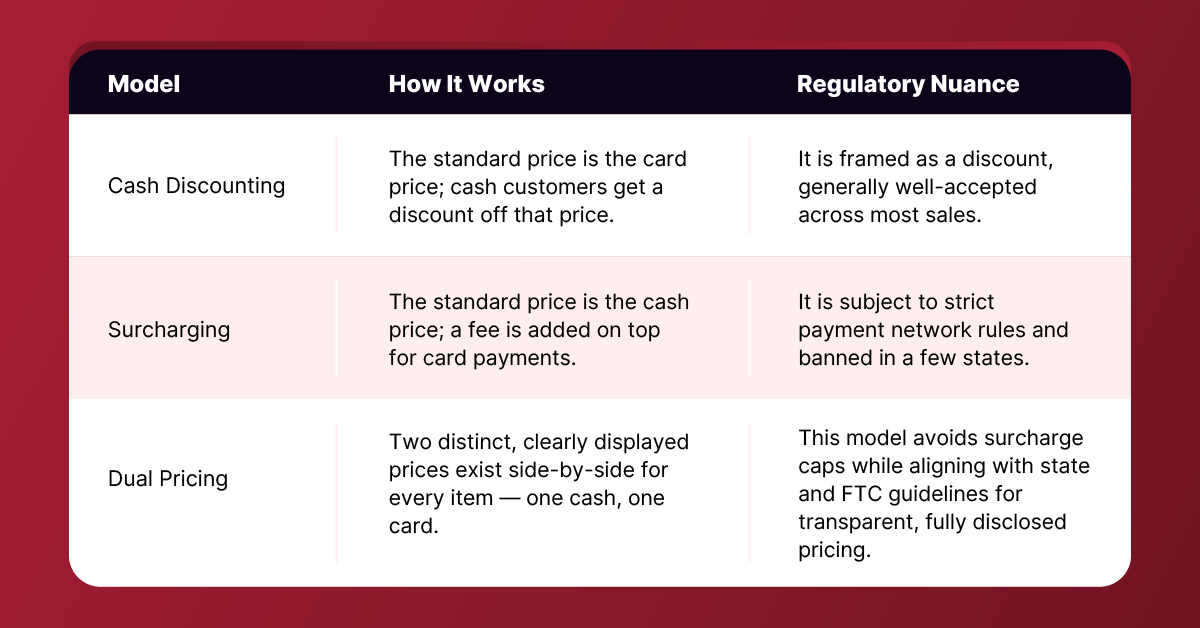
Dual Pricing

The crucial distinction between surcharging and dual pricing comes down to how prices are displayed and structured. Surcharging adds a fee at checkout to a credit transaction, which triggers card network registration, strict fee caps, and prohibitions in certain states. Dual pricing, when implemented correctly with clearly displayed cash and credit prices before purchase, operates under a separate framework. When properly structured to meet state and network transparency standards, it offers multi-state retailers a consistent, transparent pricing model.

Key Benefits of Dual Pricing for Liquor Store Owners

Direct fee savings:

This is where you see the biggest impact. By shifting card processing costs to card-paying customers, store owners can offset the bulk of their monthly processing expenses. Depending on your store’s sales volume, that can mean keeping hundreds to thousands of extra dollars in your pocket every single month.

Increased cash flow:

Every dollar not paid out in interchange fees is a dollar that stays in the business. Over a financial year, this can significantly improve cash reserves. It gives the freedom to expand stock levels, marketing, or simply build a comfortable safety net for the relaxed seasons.

Designed for Compliance:

Dual pricing meets federal standards and state surcharge laws when set up correctly. Showing both cash and card prices upfront avoids surprise fees at checkout. This approach adheres to major card network rules for cash discounting and keeps compliance risks low.

Customer trust:

It might sound surprising, but dual pricing can actually improve how customers feel about your store. The key is transparency. When both prices are out in the open, shoppers view the system as fair rather than a penalty. Your cash customers love getting a discount. Your card customers appreciate knowing the true cost upfront, with no hidden fees sprung on them at the last second.

Why is a Specialized Liquor POS Essential?

The Manual Effort

Trying to run dual pricing on a general system is a logistical nightmare. It is even worse if you try to perform it manually. Liquor stores carry thousands of items. There are constant inventory changes from seasonal wines, limited releases, sales bundles, and multi-pack discounts.

Calculating and updating two prices for every single item is tiring; keeping your shelf tags up to date is also difficult. This causes wrong prices, legal compliance issues, and frustrated consumers.

The Solution: How RetailZPOS Makes It Flawless

RetailZPOS is the ultimate solution built for a liquor store POS system. Instead of bolting dual pricing onto a generic retail platform, RetailZPOS is made from the ground up to manage the specific challenges of alcohol retail.

Automatic Price Calculations

RetailZPOS implements automated dual pricing POS logic quickly at checkout. The system counts both the cash and credit price for every item in real time, based on your configured fee percentage. There is no risk of human error at the register when you have a smart pos system.

Clear Customer Screens & Receipts

Transparency is the most important part of legal dual pricing, and RetailZPOS ensures every customer-facing screen and printed receipt clearly shows both pricing tiers before the sale is confirmed. This protects your business under federal trade guidelines and creates a great relationship with your shoppers.

Built-In Compliance Support

Every state has different rules, but RetailZPOS keeps things simple. You can easily set your store’s pricing rules, format receipts, and show clear cash-versus-card prices on customer screens and shelf tags. You stay in control, avoid pricing surprises at checkout, and protect your hard-earned profits.

Best Practices for Implementing Dual Pricing in Your Store

Implementing dual pricing successfully takes more than turning a switch on your POS. Here’s how to do it right:

Staff Training:

Your cashiers are the face of this shift. Make sure each team member understands how the cash discount program works, if a customer asks, and knows how to manage the edge cases. When the staff is trained correctly, it turns a confusing pricing change into a smooth, positive customer interaction.

Clear Signage:

Good dual pricing requires clear signs throughout the store. You need to post your pricing policy at the entrance, near the shelves, and at the register. Customers must see these signs well before they pay. When shoppers understand the prices early, you will deal with fewer surprises and complaints.

Inventory & Shelf Tag Syncing:

Imagine the frustration when a customer gets to the register and finds out the price is higher than the shelf tag. To avoid this, use pricing software that links right to your store system. When you change a price, your digital or printed labels update instantly on their own. This keeps your store honest and protects your reputation.

Conclusion

Credit card processing fees aren’t going away. But for liquor store owners, they don’t have to be an unavoidable cost of doing business anymore. A well-implemented dual pricing POS system gives you a fully compliant, customer-friendly way to offset processing costs, protect your margins, and keep more revenue in the business where it belongs.

The real difference comes down to choosing the right technology partner. A generic POS system leaves you managing dual pricing manually—item by item—opening the door to errors and compliance headaches. A specialized liquor store POS solution like RetailZPOS handles the heavy lifting: it automates price calculations, keeps receipts transparent, and gives you simple tools to align with state rules, so you can spend your time running your business instead of doing pricing math at the register.

If rising credit card processing fees have been quietly reducing your profit, now is a good time to look at how DUAL pricing, paired with the right POS technology, can put that margin back where it belongs: in your pocket.

9 Ways to Streamline Your Liquor Store Checkout Process with a POS Software

liquor store pos

9 Ways to Streamline Your Liquor Store Checkout Process with a POS Software

Running a liquor store pos can be a rewarding business, but it also comes with its fair share of challenges. One of the areas where many liquor store owners struggle is the checkout process. Long queues, slow transactions, and manual inventory management can lead to customer frustration and lost sales.

However, with the right point of sale (POS) software, you can streamline your checkout process and create a seamless experience for both your staff and customers. In this blog post, we will explore some ways to simplify your liquor store checkout process using POS software.

1. Fast and Efficient Transactions

The primary goal of a liquor store checkout process is to complete transactions quickly and efficiently. A robust POS software can help you achieve this by providing features such as barcode scanning, integrated payment processing, and automated inventory updates.

With barcode scanning, cashiers can simply scan the items, and the software will automatically retrieve the product information and calculate the total amount. Integrated payment processing eliminates the need for separate card terminals and allows for seamless payment options, including credit cards, debit cards, and mobile payments. These features can significantly speed up the transaction process and reduce customer waiting times.

2. Inventory Management

Proper inventory management is essential for any liquor store. Out-of-stock items can disappoint customers, while excess stock ties up capital and takes up valuable shelf space. POS software with integrated inventory management capabilities can help you overcome these challenges.

It allows you to track your inventory levels in real time, set automatic reordering points, and generate detailed reports on sales and stock movement. By having accurate inventory information at your fingertips, you can make informed purchasing decisions, optimize stock levels, and avoid both overstocking and stockouts.

3. Age Verification

Selling alcohol comes with the responsibility of verifying the age of customers. Manual age verification processes can be time-consuming and prone to errors. However, POS software designed for liquor stores often includes built-in age verification features.

These features typically include ID scanning capabilities, which allow cashiers to quickly and accurately verify the age of customers. By automating the age verification process, you can ensure compliance with legal requirements while speeding up the checkout process.

4. Customer Relationship Management

Building strong relationships with your customers is crucial for the success of any business. POS software with customer relationship management (CRM) features can help you gather valuable customer data and personalize their shopping experience.

Collecting information such as purchase history, preferences, and contact details allows you to tailor promotions, offers, and recommendations to individual customers. This not only improves customer satisfaction but also increases the likelihood of repeat business.

5. Reporting and Analytics

To make informed business decisions, you need access to accurate data and insightful analytics. A comprehensive POS software provides reporting and analytics features that allow you to gain valuable insights into your liquor store operations.

You can generate reports on sales trends, top-selling items, peak hours, and much more. By analyzing this data, you can identify opportunities for improvement, optimize pricing strategies, and make data-driven decisions to grow your business.

6. Integration with E-commerce

In today’s digital age, having an online presence is crucial for any retail business. Integrating your POS software with an e-commerce platform allows you to extend your reach beyond your physical store. Customers can browse your products online, place orders, and even schedule pickups or deliveries.

The integration ensures that your inventory remains synchronized across both online and offline channels, reducing the chances of overselling or underselling items. This streamlined approach enables you to cater to a wider customer base and increase sales.

7. Employee Management

Efficient employee management is vital for a smooth checkout process. POS software with employee management features can help you track employee working hours, manage shifts, and assign specific roles or permissions. These features not only simplify the scheduling process but also provide insights into individual employee performance.

By identifying top-performing employees or areas that need improvement, you can optimize staffing levels and ensure excellent customer service during peak hours.

8. Quick and Accurate Pricing Updates

With POS software, you can easily update pricing for your liquor products across the entire store. Instead of manually changing price tags or labels, the software allows you to update prices centrally, ensuring accuracy and consistency. This eliminates the need for manual price changes at the checkout counter, saving time and reducing the risk of errors.

Furthermore, the centralized pricing updates provided by POS software also enable you to respond quickly to market changes, promotions, or seasonal pricing adjustments, ensuring that your liquor store remains competitive. By effortlessly managing pricing across your store, you can focus on delivering exceptional customer service and growing your business.

9. Security and Fraud Prevention

POS software provides robust security features to protect your liquor store’s transactions and sensitive customer data. It offers encryption and tokenization to safeguard payment information, reducing the risk of data breaches. Additionally, the software can monitor for suspicious activities and flag potential fraud, helping to maintain a secure checkout environment.

Furthermore, POS software allows you to set user permissions and access levels, ensuring that only authorized personnel can handle sensitive information and perform certain actions within the system. This adds an extra layer of security and minimizes the risk of internal fraud or unauthorized data manipulation. With these comprehensive security measures in place, liquor store owners can have peace of mind knowing that their customers’ transactions and data are well-protected.

Conclusion

Implementing a robust POS software solution in your liquor store can significantly streamline the checkout process. From fast and efficient transactions to inventory management, age verification, customer relationship management, reporting and analytics, integration with e-commerce, employee management, quick pricing updates, and enhanced security, POS software offers a multitude of benefits.

By leveraging these features, liquor store owners can enhance efficiency, accuracy, customer satisfaction, and profitability. Embrace the power of POS software and take your liquor store to new heights in today’s competitive retail landscape.

Experience the ultimate checkout efficiency with the Retail POS system. Streamline operations, enhance security, and delight customers with our robust features. Elevate your liquor store’s success today. Visit our website for a demo and start transforming your business!

5 Liquor POS System Features Your Store Must Have

liquor-pos-system-features_comp

5 Liquor POS System Features Your Store Must Have

Ecommerce has had its fair share of growing pains as it transitions into a mainstream retail destination. Many brick-and-mortar retailers were caught off guard by the monumental shift in shoppers’ purchase paths, and features that were formerly regarded as standard in most grocery stores’ POS are barely being utilized today.

Several brick-and-mortar retailers have shuttered their doors in the past few years or found themselves forced to sell to stay afloat. This is due largely to competition from online retailers such as Amazon and Walmart. Consumers use their devices for nearly every facet of their shopping experience; bargain hunting, price comparison, and ultimately fulfillment of purchases.

Coming to the liquor industry, it’s no different. Online sales have been soaring as more consumers shop from the comfort of their homes. Retail experts predict that online sales for liquor pos systems will be at about $21 billion by the end of 2023. That’s roughly an additional 8 percent growth year over year.

But for all of its success, eCommerce has its drawbacks. First and foremost is security, followed closely by price transparency and delivery. Ecommerce retailers have little control over these variables (outside their websites) as they are out of their hands.

Hence, every liquor pos system owner wants a system that is easy to use, customer-friendly, and profitable.

A dependable Retail POS System simplifies business operations by allowing you to manage your sales, inventory, and employees effectively. Most importantly, it can assist you in providing a flawless customer experience that will keep them wanting to return. While POS systems benefit all businesses, they are especially beneficial to bars due to their fast-paced environment! A bar Point-of-Sale system is a computerized cash register that allows bar managers to track and control inventory and generate sales analysis reports. A POS system will make more efficient pricing decisions and reduce the risk of costly errors.

That’s why, in today’s blog, we’ll go over 5 essential features of a bar POS system and why they’re so important in this industry.

Liquor & Bar Inventory Management

Most high-quality POS systems include real-time inventory control software that shows you how much inventory you have on hand at any given time. These programs and APIs allow you to track your liquor inventory, suppliers, and prices independently. This makes it extremely simple to determine what to reorder and when. You won’t have to spend hours updating a spreadsheet manually. Simply check your system to see if it has all the required inventory management features.

Payment Preauthorization

Payment pre-authorization lets bartenders securely swipe a customer’s credit/debit card and save the details as their bar tab. The bartender can use this to determine whether the card is genuine and has enough funds to pay the bill. This is critical because credit card fraud is on the rise.

You can avoid the following problems by using a bar POS system that uses payment processing that allows pre-authorization of credit and debit cards:

  • Fake identification cards
  • Cards taken
  • Unpaid cheques

Order Customization

When you select a fully customizable and functional system, you will have a unique product that is crafted to your needs and completely original! The possibilities are endless. Your guests will love their unique experience. The bar POS system will be able to process orders quickly and efficiently. This means you won’t have any delay while they wait. As a result, your guests will call back time and time again! No bar is the same, so why should your POS system be? Don’t settle for anything less when you can create the perfect POS system that is uniquely yours.

Easy Menu Management

Selecting a POS system that allows you to effortlessly make changes to your menu in real-time from any location is critical. You’ll need a system that can handle changes to your happy hour menu, seasonal menus, and regular inventory changes from week to week or day to day. We recommend paying attention to the details when looking for the best Retail POS system in Atlanta. Avoid POS systems that take more than 5 minutes to update menu items or require a reboot. Modern POS systems perform actions instantly and have interfaces that simplify changes.

Cloud Technology

You need a solution that can be accessed from any location at any time in our fast-paced world. Your POS system needs to be scalable as your company expands. If you’re searching for this, a cloud-based POS system is what you require. The advantages of cloud-based POS systems are as follows:

  • inventory updated in real-time
  • Data can be retrieved from any device with ease.
  • Employees can easily access and amend their schedules.
  • By providing a range of payment methods, you can enhance client satisfaction.

Best Bar POS system providers

No merchant should let out time and energy on laborious activities that may be completed quickly on a POS system because managing a bar is not an easy undertaking. A solid POS system can work wonders for you to enhance customer satisfaction and simplify business management.

RetailzPOS provides the best POS systems and services for businesses like yours. Get in touch with us!