
The 2026 Liquor Store POS Systems: A Complete Buyer’s Guide
There has been a significant change in the profitability and rewards available in the liquor business over the last few years. There is no question that, in earlier days, having a cash register and a basic credit card processor was sufficient to run a business successfully. But in 2026, the reality is that the liquor store industry operates on low returns, in complex regulatory environments, and with a consumer base that expects an “Amazon-level” advantage. To compete successfully in the world of liquor retailing, it’s no longer enough just to have a point-of-sale system; you need an all-in-one system to grow both sales and margin.
This guide covers everything you need to know to select a liquor store POS system that secures your license, optimizes your inventory, and generates revenue.
Key takeaways
- Track Every Drop: Your system should automatically know that selling one bottle of beer reduces your “6-pack” and “case” inventory. No more manual counting.
- Stop Fake IDs: Use 2D scanners that catch advanced fakes and expired licenses instantly. This protects your liquor license and keeps you legal.
- Get Paid by Brands: Use “ScanData” to automatically share sales info with big brands. In return, they send you rebate checks that go straight into your pocket.
- Save on Credit Card Fees: Use “Dual Pricing” to show a cash price and a card price. This helps you get back the 3% or 4% you usually lose to bank fees.
- Sell Online & In-Store: Your POS should talk to apps like DoorDash or UberEats. If you sell your last bottle in the store, it should disappear from the app immediately, so you don’t have to cancel orders.
Why Liquor Stores Need Specialized POS Systems?
While most liquor store POS software is designed to work for any business, liquor stores are not “any” kind of business. With complex inventory structures and strict laws, standard POS software will only create more work than it saves.
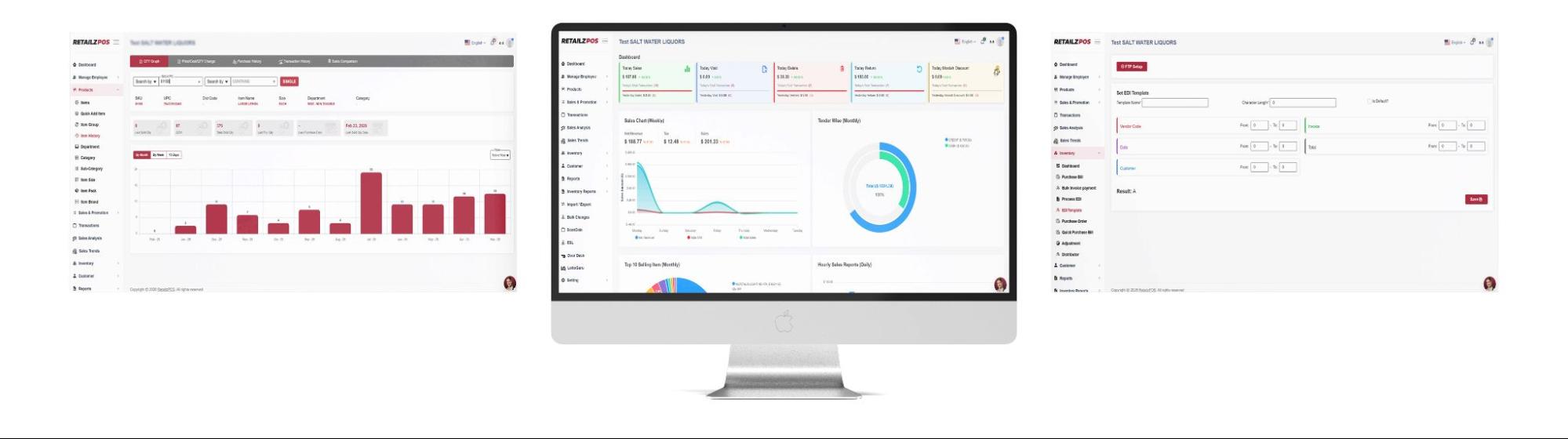
From complex inventory units to strict legal mandates, a standard retail system often creates more work than it saves. Because they manage the same product in three different forms- cases, packs, and single bottles, there is a high chance of increasing manual workload and errors. However, a pos system would require a liquor pos integration to boost your bottom line. Indeed, there are unique liquor POS systems, such as RetailzPOS, designed to address a liquor store’s specific “pain-points.” For example, this POS software simplifies unit conversions. When you sell a single bottle, it automatically adjusts your packs and cases accordingly. Furthermore, this liquor store pos system connects your back office to your front-end sales.
Stay Compliant Automatically—Without the Extra Effort:
In 2026, Compliance is more than just reminding staff to check an ID. It’s a digital-first operation built directly into your POS system. Modern POS systems use 2D barcode scanning to instantly verify IDs, which helps capture advanced fake IDs and expired licenses that the human eye often overlooks. These barcode scanning POS also automate the “nightmare” of regulatory compliance. You no longer needed to manually reconcile sales for state excise taxes or volume limits. The software also generates audit-ready logs and tax-mapped reports in real-time. It automatically applies precise tax rates to beer, wine, and spirits while recording every restricted transaction.
Manage Inventory from Cases to Singles:
One of the biggest reasons liquor stores need a POS system is to manage inventory. Suppose you receive a shipment of 50 cases of XYZ beer and sell some as full cases, some as six-packs, and others as individual cans. An alcohol inventory management POS system like RetailzPOS supports tracking parent-child relationships. Say a consumer purchases a single can; the system automatically updates your inventory by deducting the exact portion from the case. This confirms that your stock levels are accurate across all SKUs without requiring manual counting every day. Under today’s liquor POS standards, failing to track bottle sizes accurately results in hidden inventory loss.
ScanData & Vendor Rebate Programs:
In liquor retail, actual profits come from the backend: manufacturer rebates and incentive programs offered by major alcohol distributors. ScanData programs let retailers securely share sales data with suppliers in exchange for per-unit discounts. Liquor store compliance software handles this automatically. Instead of manually pulling reports or managing spreadsheets, the system collects the data and sends it to the vendor. This feature makes it easier for stores to run promotions like buy two, save $1, without cutting into your margins because the vendor pays you back.
Market Insight: The liquor POS software market is hitting its stride. Valued at $3.2 billion in 2024, it’s projected to reach $5.4 billion by 2030—a steady 9.1% annual growth rate according to Strategic Market Research.
Must-Have Features for Liquor POS System 2026
One Inventory for Every Way You Sell:
When a consumer purchases the last bottle of a rare bourbon in-store, your website and third-party apps (Drizly, Uber Eats, DoorDash) must be able to handle the change in real time. By utilising cloud-based POS as the unified data source, you eliminate inventory falls that lead to disappointed customers and manual order cancellations. Your team can sell more through digital channels without increasing manual workload.
Never Run Out with Automatic Restocking:
Your inventory should move as fast as your customers. Modern Point-of-Sale (POS) ecosystems now utilized advanced AI to address the critical gap between backend stock and real-time market demand. As an omnipresent analytical layer, the liquor store POS system identifies trends by analyzing seasonal and small-scale dynamics. This allows you to predict shortages with clarity rather than simply reacting to them.
Once it reaches a set limit, the system voluntarily generates a complete purchase order, ready for instant verification and one-click transmission to your distributor. Such flawless integration gives excellent product availability, reduces idle capital, and ultimately boosts your cash flow.
Reduce Processing Fees with Dual Pricing:
Credit card processing fees are often the biggest monthly headaches for liquor store owners. Today’s liquor store POS software includes dual pricing features that clearly show cash and card prices, keeping things transparent for customers while helping you retain more of every sale. And because our payments are fully integrated, your terminal and POS stay in perfect sync. We will no longer have to deal with manual-entry errors in which a $100 bottle of bourbon rings up as $10. It’s about making sure you get paid exactly what you’re owed, every single time.
Total Security and Staff Access Management:
Who handles what at the register? A good liquor store pos lets owners decide exactly which staff can open tills without a sale, process returns, or give price cuts. When someone hits void or refund, modern setups integrate directly with camera feeds. That exact second gets marked automatically in the video stream. Reviewing events is faster when the moment stands out clearly. Oversight improves. The risk of theft decreases when actions are linked directly to visuals.
How to Choose the Right Liquor Store POS Software?
With so many options available in the market, the selection process becomes challenging. To make the right decision for your particular business, focus on these three pillars:
Clear Pricing for Hardware, Software, and Processing Fees:
Look beyond “free” hardware offers and focus on long-term value. These companies often offset hardware costs through higher payment processing rates over time. When calculating the costs, look at the total cost of ownership:
- Consider hardware costs. Is it proprietary, or can you use standard tablets and printers?
- Software costs. What is the monthly subscription fee, and does it include all features, or are there “add-ons”?
- Don’t forget processing costs. Are you forced to use their processor, or can you shop around for the best rates?
Built to Scale from Your First Shop to Your Fiftieth:
You should pick a point-of-sale system that can manage ten stores in the future, even if you only have one store now. Having a “Multi-Store Management” dashboard is necessary for expansion. It should be possible to transfer inventory from a store with low sales to one with high sales, and to change the price of a particular product across all locations. The industry norm is cloud-based systems. Whether you are physically present at the store or not, you can view sales data on your smartphone.
Expert Support and Training to Keep Your Business Running:
The worst time for your POS to crash is at 6:00 PM on Friday. For what reason? Because of the high volume, it’s probably during peak hours. Take into account the following before signing a contract:
- Do they provide round-the-clock, US-based support?
- Does the POS screen include a “Live Chat” feature?
- How long does it typically take to get support?
An easy-to-use system is also essential. You cannot afford to train every new hire for 20 hours, given how high retail turnover is. Floor errors and training time can be decreased with an easy-to-use point-of-sale system such as RetailzPOS.
TL;DR: Must-Have Liquor Store Features
- Cash Discounting: Built-in rules to protect your margins.
- ID Scan Prompts: Mandatory age verification to eliminate legal risk.
- Audit Logs: Real-time inventory tracking to stop shrinkage.
- No Processor Lock-in: The freedom to choose your own payment provider.
- Custom Permissions: Secure access levels for different staff roles.
- Hardware Flexible: Use your existing equipment to save costs.
- Offline Mode: Keep selling even if your internet goes down.
- Multi-Store Ready: Manage all locations from one central dashboard.
- Shift Summaries: Fast, granular reporting for easy reconciliation.
- Accounting Sync: One-click integration with QuickBooks and ScanData.
Final Thoughts
The competition in the liquor industry is fiercer than ever. You are facing off against big-box algorithms and delivery giants with limitless reach, not just the store down the street. You must use cutting-edge technology that makes your operations more intelligent, efficient, and compliant with regulations if you want to stay in the market. Your company’s core is a smart liquor store point-of-sale system. You are creating a roadmap for your store by automating compliance, managing inventory, and embracing omnichannel sales.
From managing multiple stores to providing regulatory protections, RetailzPOS handles the heavy lifting with complete transparency and no hidden costs. It’s the tech you need to get back to what matters: your customers and your growth.
FAQs:
1. Do I really need a liquor-specific POS, or can I use a regular retail system?
While a standard retail system handles basic transactions, it often falls short in the highly regulated world of alcohol. A liquor store pos offers case break capabilities, age-verification prompts, mix-and-match pricing, and wholesale reports.
2. What happens to my sales if the internet goes out?
Our RetailzPOS is cloud-based for easy management, but we know outages happen. Our system includes an offline mode that lets you continue ringing up sales locally. Once your connection is restored, all data automatically syncs to the cloud.
3. How does RetailzPOS handle “Case Breaks” and inventory?
RetailzPOS has an Automatic Inventory Cascading feature. When a single bottle is sold, the system immediately updates the stock levels for all units and “breaks” a case in the digital inventory.
4. Can I automate my ordering with distributors?
Yes. RetailzPOS supports EDI Invoicing. This allows you to receive invoices from major distributors electronically. You can review and “accept” the electronic invoice to update your stock counts and cost data.
